Find the accessibility problems on your site. Then actually fix them.
StoryNova Accessibility scans every page against WCAG rules, applies eleven safe fixes automatically, gets your images their alt text, and writes the accessibility statement your lawyer will ask for. No overlay, no yearly fee.
The scan runs in your browser. Nothing about your site is sent anywhere.
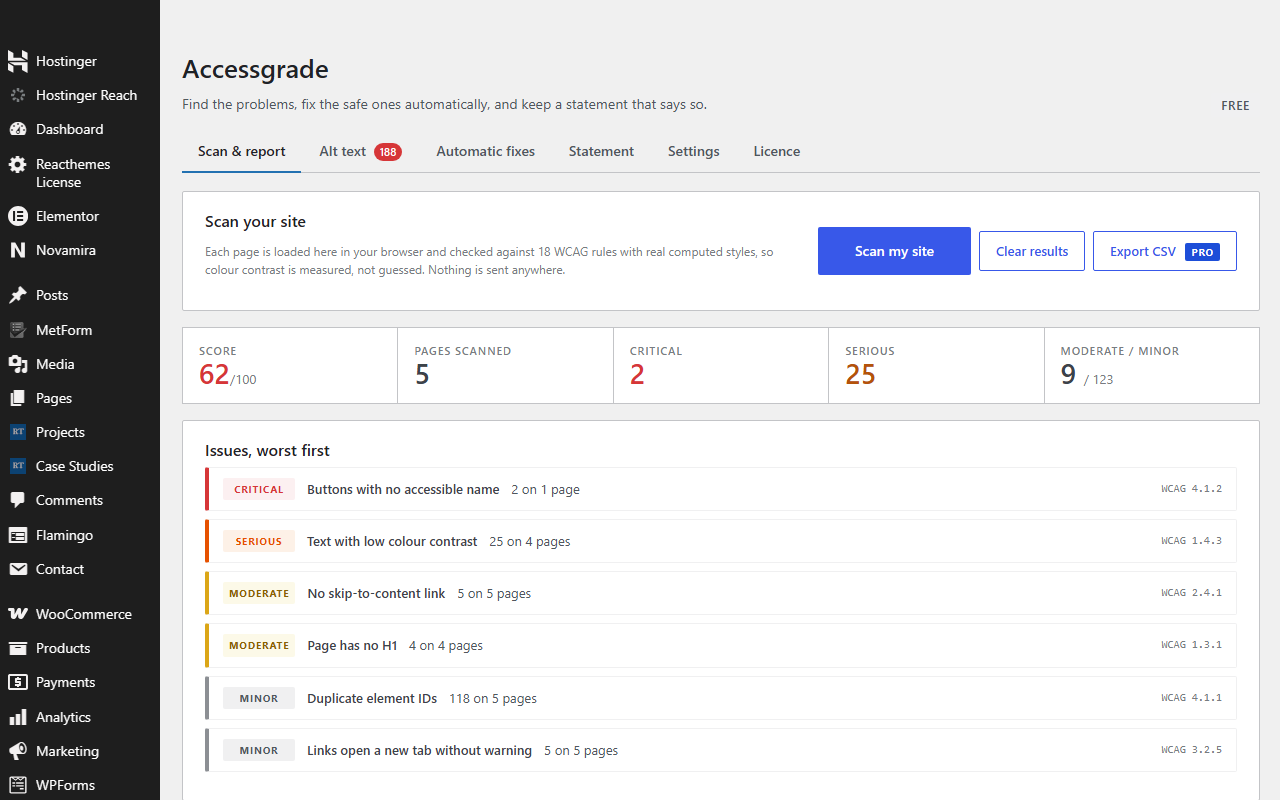
Four things, in the order a complaint checks them
Demand letters almost always cite the same failures: alt text, labels, contrast, keyboard access. StoryNova Accessibility starts there.
See exactly what is wrong
Every page loads in your browser and is checked with real computed styles. Each issue shows the element, the WCAG rule, and how to fix it.
The safe ones, automatically
Skip link, page language, alt text from the Media Library, new-tab warnings, iframe titles, focus ring, labels from placeholders, names for icon links. Adds, never removes.
Every image, described
A grid of images with no alt text. Type it, or let AI suggest it with your own API key, approve, save. It applies wherever the image is used.
The page lawyers look for
An accessibility statement built from your details and your latest score, with a contact route and a footer link. Never stale.
Why not an overlay widget?
Overlays add a button that restyles the page for the visitor. They do not change the page's code, so the problems stay, and they cost about $490 a year per site.
Overlay widget about $490 / year
- Adds a floating button and CSS tweaks
- Leaves missing alt text, labels and headings in the code
- Automated scans still fail afterwards
- Renews every year, per site
StoryNova Accessibility free, Pro from $79 once
- Fixes the page markup where it can
- Gets every image its alt text
- Shows you the rest, with the element and the rule
- Includes a toolbar for visitors too, because they expect one
What automated tools can and can't do
Automated checks cover only part of WCAG. StoryNova Accessibility finds and fixes the common failures those checks catch, including the ones demand letters usually cite. Full conformance also needs a person with a keyboard and a screen reader. No plugin, ours included, can promise legal compliance. We'd rather tell you that here than have your lawyer tell you later.
Pay once, or pay yearly. Never both.
Less than two months of an overlay subscription, and it fixes things.
Free
- Scan every page and post, as often as you like
- All 11 automatic fixes
- Alt text workflow, written by you
- Accessibility statement page
- Visitor toolbar
GPL. Also on WordPress.org.
Pro
- Everything in Free, plus a small Pro add-on you install next to it
- Scan products, portfolios and any other custom content
- Full-site scan, not just what you edit
- AI alt text suggestions with your own API key
- Weekly or monthly check-in reminders
- CSV report export for clients or counsel
- Licence for 2, 10 or unlimited sites, every future update
30-day refund, no questions asked. Terms.
Free against free
Paid against paid
Questions people ask
How do I install Pro?
Keep the free plugin installed and upload the StoryNova Accessibility Pro add-on from your purchase email, then paste your licence key on its Pro tab. The free plugin never expires and never locks anything; Pro only adds features.
Will this make me ADA compliant?
No tool can promise that, and you should be wary of any that does. StoryNova Accessibility fixes the most common automated failures and gives you an honest list of what remains for a manual review.
Do I need the AI feature?
No. You can write alt text yourself. With an Anthropic key it suggests descriptions you approve, at a cost to you of well under a cent per image, paid to Anthropic directly.
Does it work with my page builder?
Yes. It scans rendered pages, so Elementor, Divi, Bricks, WooCommerce and block themes are checked the same way a visitor's browser sees them.
Will the fixes change how my site looks?
Only the focus ring and optional link underlines are visible. Everything else adds hidden information for assistive technology.
How do I install it?
Download the zip, then in WordPress go to Plugins → Add New → Upload Plugin, choose the zip and click Install, then Activate. Pro features switch on when you paste your licence key on the plugin's Licence tab. No FTP and no build step. Updates arrive through the normal WordPress plugin updater.